
Online examination system viva: timers, MCQs, and auto-scoring
Defend a MERN exam portal: JWT roles, countdown integrity, auto-scoring, attempt locks, and teacher analytics — with a four-minute demo script.
Rajan
Founder & engineer
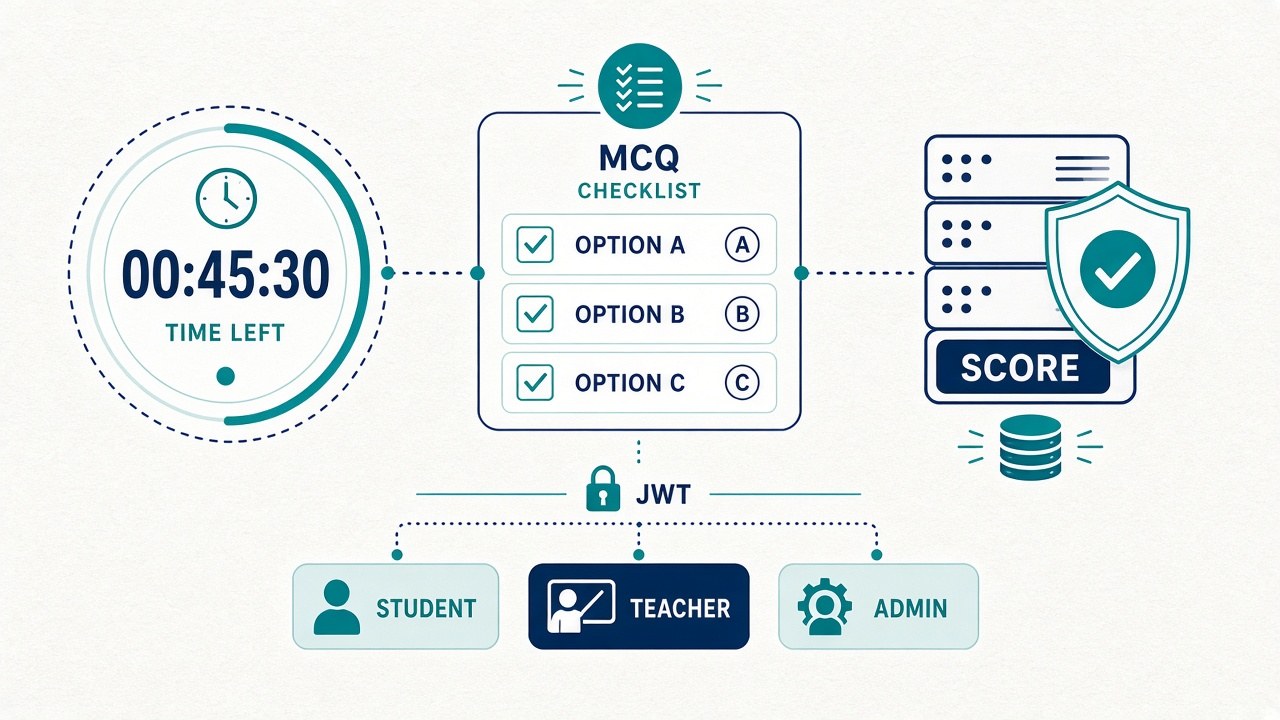
Online examination systems are a favorite Indian final-year theme because everyone understands the story: teacher creates a paper, student sits a timed MCQ test, system scores and publishes results. That familiarity is a trap. Panels have seen dozens of exam portals. They will not ask you to recite HTML form tags. They will ask whether the timer is trustworthy, whether a student can resubmit, where authorization lives, and how you handle refresh mid-exam.
This guide prepares you for that conversation. It assumes a MERN-style portal like Online Examination System: teachers manage question banks and exams, students attempt under a countdown, objective answers auto-score, admins manage users/courses. Pair with JWT auth in MERN, what examiners look for, and common viva mistakes.
Opening pitch (30–40 seconds)
“Our system is a role-based online examination portal. Teachers create courses, question banks, and timed exams. Students start an attempt, answer MCQs under a server-aware countdown, and submit once. The backend auto-scores objective questions, locks the attempt, and exposes results to the student and analytics to the teacher. Admins manage users. We focus on attempt integrity — duration, single submission, and JWT-separated roles — not on remote proctoring cameras.”
Then demo. Do not open with a history of CBT in India unless asked.
Correct the panel’s mental model early
Many examiners assume you built:
- ▸Full descriptive-answer NLP grading
- ▸Webcam proctoring / face detection during the test
- ▸Offline question paper PDF generation for the controller of exams
If you did not, say so:
“Our scope is objective MCQ auto-scoring with timed attempts and RBAC. Descriptive marking and proctoring are future work noted in limitations. Claiming proctoring we did not build creates questions we cannot answer.”
That sentence saves you.
Architecture you should draw once
- ▸Clients: React (Vite) student, teacher, and admin views (often one SPA with route guards).
- ▸API: Express routers per resource — auth, users, courses, questions, exams, attempts, results.
- ▸Auth: JWT access tokens; role claim (
admin|teacher|student). - ▸Data: MongoDB collections for users, questions, exams, attempts (answers + timestamps), results.
- ▸Timer: exam
durationMinutes+ attemptstartedAt; remaining time computed; submit allowed until expiry; late submit rejected or auto-submitted per your rule. - ▸Scoring: compare selected option ids to correct keys server-side; never trust a client-sent score.
Memorize: score is computed on the server.
Roles and trust boundaries
| Role | Can do | Must not do | | --- | --- | --- | | Student | Start allowed exam, answer, submit own attempt, view own result | Read other attempts, see correct keys before submit, change duration | | Teacher | CRUD questions/exams for own courses, view per-exam analytics | Elevate self to admin without audit story | | Admin | Users, courses, global config | Needlessly hold question edit if you separated duties |
Q: Where do you check roles?
A: Middleware on protected routes — after JWT verify, before controller logic. UI hiding a button is not security.
Q: Can a student call the score API with score: 100?
A: No. Client may send answers; server grades. Reject client-supplied totals.
See MERN library RBAC viva for the same authorization mindset in another domain — the Smart Library Management System is a good sibling project if your panel likes role demos.
Timer integrity — highest-value viva topic
Students will try to refresh, change system clock, or leave the tab open overnight. Be ready.
What you actually implemented
State your real rule, for example:
- ▸On start, server creates
Attempt { userId, examId, startedAt, status: 'in_progress' }. - ▸Remaining time =
duration - (now - startedAt)using server time. - ▸Client countdown is UX only; submit endpoint re-checks expiry.
- ▸On expiry, status becomes
auto_submittedor answers freeze — pick one and stick to it in report and code.
Q: What if the student sets the laptop clock back?
A: Server time wins. Client clock is irrelevant for authorization of submit.
Q: What if they refresh the page?
A: Reload answers from the in-progress attempt document if you autosave; timer continues from startedAt, not from zero. If you do not autosave, admit data loss on refresh as a limitation — better than inventing autosave.
Q: Can they open two browsers?
A: Same attempt id; last write wins or you reject concurrent sessions if you built that. If not built, list as limitation / future work (single active session token).
Anti-refresh theater vs real controls
Disabling right-click in the browser is theater. Serious controls are server-side: one attempt, immutable after submit, answers graded centrally. Mention UI deterrents only as UX, not as security.
Question bank and exam model
Sensible schema talking points:
- ▸
Question: stem, options[],correctOptionId, difficulty, courseId, createdBy. - ▸
Exam: title, courseId, questionIds[] or sampled count,durationMinutes, open/close window, createdBy. - ▸
Attempt: examId, studentId, startedAt, submittedAt, answers[], status. - ▸
Result: attemptId, score, maxScore, published flag.
Q: Fixed paper vs random sample?
A: Know which you built. Random sampling needs a seed story and fairness note (same difficulty mix). Fixed papers are easier to defend in undergrad scope.
Q: How do you prevent leaking the answer key in API responses?
A: Student-facing question fetch omits correctOptionId until after submit (or never sends it to student role). Teachers get keys on editor routes only.
Auto-scoring narrative
For each answer: if selectedOptionId === correctOptionId, add weight (usually 1). Total = sum. Persist on submit transactionally with status submitted.
Q: Negative marking?
A: Only if implemented. If not: “Future work; current model is +1 / 0.”
Q: Partial credit for multi-correct?
A: Same — do not claim multi-correct if options are single-choice in UI.
Q: Descriptive answers?
A: Stored as text for teacher review if you added the field; otherwise out of scope. Do not claim NLP grading.
Attempt locking and idempotency
Demo gold: submit once → button disabled → second POST returns 409 or “already submitted.”
Unique index mindset: (examId, studentId) for attempts so a student cannot create two in-progress rows for the same paper (unless your product allows retakes — then version attempts explicitly).
Q: Retakes?
A: Either disabled, or maxAttempts on exam with clear numbering. Ambiguity here causes viva confusion.
Analytics teachers expect
Even simple charts read as complete:
- ▸Score distribution for one exam
- ▸Per-question correct rate (item difficulty)
- ▸List of absentees (enrolled but no attempt)
Q: How is per-question stats computed?
A: Aggregate submitted attempts; for each questionId, count correct / total answered. Show one Mongo aggregation or equivalent service method if asked.
Demo script (about four minutes)
- ▸Admin/Teacher: show course and a 10–15 question bank.
- ▸Create exam: duration 10 minutes (short for viva), attach questions.
- ▸Student login: start exam — countdown visible.
- ▸Answer 3–4 questions; mention autosave if present.
- ▸Submit — show score.
- ▸Submit again — blocked.
- ▸Teacher: open analytics / result list.
- ▸Optional: start another student attempt and let timer be near zero to show expiry behavior (prep a nearly-expired attempt in seed if live wait is awkward).
Seed script should create teacher, student, and sample exam — empty banks kill demos. Seed data habits apply.
Extended Q&A bank
Q: Why MongoDB?
A: Flexible documents for questions with variable options; fast iteration for undergrad scope. Justify indexes on examId, studentId.
Q: Why not Spring Boot?
A: Team skill and syllabus alignment with MERN; same RBAC ideas transfer.
Q: How do you store passwords?
A: Hashed (bcrypt/argon2) — never plaintext. JWT after login.
Q: XSS in question text?
A: Sanitize or text-encode rendered stems; teachers are privileged but still untrusted for script injection.
Q: Can students see others’ results?
A: Results routes scoped by req.user.id unless teacher/admin role.
Q: Mobile app?
A: Responsive web is enough unless you built Flutter; do not promise native apps.
Q: Integrates with university ERP?
A: Out of scope; export CSV of results as pragmatic bridge — similar to attendance CSV stories in face recognition attendance viva.
Q: Accessibility?
A: Keyboard focus, label text, color contrast — mention if you tested; else honest gap.
Q: Load of 500 concurrent students?
A: Undergrad deployment is single VM/demo; discuss horizontal scale as future work (sticky sessions, Redis timer store) without claiming you load-tested 500.
Testing table worth putting in Chapter 6
| Case | Steps | Expected | | --- | --- | --- | | Happy submit | Start → answer → submit | Score persisted, status submitted | | Double submit | Submit twice | Second rejected | | Early expiry | startedAt forced old | Submit rejected or auto-finalized | | Wrong role | Student POST create exam | 403 | | Missing token | No Authorization header | 401 | | Key leak check | Student GET questions | No correctOptionId field |
Run these once; screenshot Postman or logged responses for the report.
Report and slide alignment tips
- ▸Chapter 3: use cases — Create Exam, Attempt Exam, Publish Results.
- ▸Chapter 4: ER/collection diagram including Attempt.
- ▸Chapter 5: timer + scoring algorithms in plain language + sequence diagram for submit.
- ▸Chapter 6: the table above.
- ▸Slides: one slide only on timer integrity — panels remember it.
Customize college name and seed courses (customize guide). Differentiate from other exam portals on campus with your own question domain (e.g., only DSA midterms) — same project differentiate.
Sequence: submit attempt (narrate this)
- ▸Student clicks Submit → client sends
{ attemptId, answers[] }with JWT. - ▸Auth middleware loads user; ensure
attempt.studentId === user.id. - ▸Load attempt + exam; if status ≠
in_progress, reject. - ▸If
now > startedAt + duration, reject or finalize per policy. - ▸Load correct keys server-side; compute score; set status
submitted,submittedAt. - ▸Optionally upsert
Resultand return{ score, maxScore }.
If you can write that sequence on the whiteboard without opening the IDE, you are ready for follow-ups.
Comparison talking points (if the panel compares topics)
| Theme | Your angle | | --- | --- | | vs Google Form quizzes | Roles, attempt lock, analytics, campus branding, code ownership | | vs Library management | Different domain; same JWT/RBAC skills transfer | | vs Proctoring startups | You built assessment workflow, not invigilation AI |
Stay proud of undergrad scope. Do not apologize for skipping proctoring.
Integrity and scope honesty
If you used a scaffold or package, document what you changed: new questions, duration rules, UI branding, an extra analytics chart, tighter attempt locks. Do not claim you invented JWT. Academic integrity applies the same as for AI projects.
Limitations slide (use nearly verbatim if true)
- ▸No webcam proctoring or lockdown browser.
- ▸MCQ only; descriptive unmet or manual.
- ▸Clock skew handled by server time; no formal NTP audit.
- ▸Single-region deployment; not exam-board scale.
- ▸Randomization (if any) is basic.
Panels respect bounded scope.
Environment and deployment answers
Q: Where do you host the demo?
A: Localhost or a single VPS/Render/Railway-style deploy for viva week. Mention env vars for MONGODB_URI and JWT_SECRET. Do not hardcode secrets in the repo you submit.
Q: HTTP vs HTTPS?
A: Production should be HTTPS so JWT/cookies are not trivial to sniff on lab Wi‑Fi. Local HTTP is fine for development.
Q: File uploads for questions with images?
A: Only if implemented (Cloudinary/local disk). If stems are text-only, say so — image MCQs are a nice enhancement, not mandatory.
Keep a printed or PDF cheat sheet of env steps for the lab machine; viva halls break Node installs often.
Seed content that makes analytics non-empty
Empty charts look unfinished. Before viva week, seed at least:
- ▸1 teacher, 2 students
- ▸12–20 MCQs in one course
- ▸1 short-duration exam
- ▸2 submitted attempts with different scores
Then open the teacher analytics view once and screenshot it for slides. Panels believe numbers they can see.
If Instant delivery includes a seed script, run it cold on a clean database the night before — do not assume yesterday’s local Mongo still exists on the lab PC.
Sample oral answers (memorize structure, not wording)
“Explain your timer.”
“Duration is stored on the exam. When the student starts, we persist startedAt on the attempt. The UI counts down for usability. On submit, the API recomputes elapsed time with server clocks and rejects or finalizes if over duration.”
“How do you stop cheating with DevTools?”
“We do not claim to stop all client tampering. We never trust a client score. Answer keys are omitted from student question payloads. Submit is single-shot. Proctoring is out of scope.”
“What did you test?”
Walk the Chapter 6 table: happy path, double submit, expiry, 401/403, key-leak check. Offer to open the network tab on submit.
Teacher vs student data visibility drill
Ask a friend to play teacher while you play student on two browsers. Confirm:
- ▸Student cannot open
/api/exams/:id/analytics - ▸Teacher cannot read another teacher’s drafts if you scoped by
createdBy - ▸Admin can list users
If any of those fail, fix before viva — that demo beats another CSS animation.
Soft next step after reading
Rehearse on a running build — start from the Online Examination System page for Instant / made-to-order options, or compare RBAC storytelling with Library Management. Browse more MERN themes on the MERN hub. Use WhatsApp when you are stuck on setup or scope, not as a substitute for the timer drill above.
Closing rehearsal checklist
- ▸[ ] Explain server-side scoring in one minute without slides
- ▸[ ] State exact refresh behavior
- ▸[ ] Show double-submit guard live
- ▸[ ] Show teacher analytics with non-empty data
- ▸[ ] Answer “where is role checked?” with middleware file name
- ▸[ ] Name two limitations without apology loops
Takeaway: An online examination viva is won on attempt integrity and trust boundaries, not on fancy timers in CSS. Know how startedAt and duration interact, keep scoring on the server, lock attempts, and demo roles cleanly — then your Online Examination System reads as engineering instead of a form tutorial.
Ready to work on your own project?
We build complete final year projects with source code, report, slides, and viva prep. Pick a project from ₹499 — Instant download when ready, or 50% now for made-to-order.
Browse projects